I’ve been working with MapLibre a lot recently, and every so often I come across a weird bug. This one was particularly annoying; our corporate font doesn’t have the glyphs required to render certain characters. Rolling around the map I’d spot places like Vit Nam (Việt Nam), and Smoa (Sāmoa), and put it on my to-do list to deal with later.
Well, now is later. And I have to find a fix.
My first thought was that we were possibly using the wrong place names. My second thought was to change the field we take names from. I don’t recall what the default was, but changing it to name:en was enough to get most labels rendering properly.
However Samoa was stubborn; I was still getting “Smoa”, and had to do some investigation to work it out.
What’s in a tile?
Web maps use tiles to break up data downloads, and modern ones use the pbf (protocolbuffer format) rather than PNGs or JPEGs. PBFs give you vector data so you can style your maps on the frontend.
My first step was to determine if the issue was in the data itself, or the rendering. I identified the specific pbf tile by zooming right in on Samoa and picking a random one out of the network tab, then downloaded it to inspect.
Since I don’t have time for this, I got the AI to write a script to list the properties the renderer could use, using @mapbox/vector-tile:
import fs from 'node:fs/promises';
import Pbf from 'pbf';
import { VectorTile } from '@mapbox/vector-tile';

const data = await fs.readFile('tile.pbf');
const tile = new VectorTile(new Pbf(data));

// Inspect the 'place' layer where country labels live
const layer = tile.layers.place;

// Find the feature by ISO code using a functional approach
const samoa = Array.from({ length: layer.length }, (_, i) => layer.feature(i))
  .find(f => f.properties.iso_a2 === 'WS');

if (samoa) {
  console.log(JSON.stringify(samoa.properties, null, 2));
}
This filtered through the features and printed every property available on the country object, which I think will be useful for all kinds of other styling purposes. The output, truncated:
{
  "class": "country",
  "iso_a2": "WS",
  "name": "Sāmoa",
  "name:am": "ሳሞአ",
  "name:ar": "ساموا",
  "name:be": "Самоа",
  "name:bg": "Самоа",
  "name:br": "Samoa",
  "name:ca": "Samoa",
  "name:da": "Samoa",
  "name:de": "Samoa",
  "name:el": "Σαμόα",
  "name:en": "Sāmoa",
In this specific tile set, every common English fallback property contained the non-ASCII character ā. Since our custom brand font didn’t include a glyph for that character, MapLibre dropped it leaving us with “Smoa”.
So like, ok now what? Search & replace for MapLibre labels
Since I have no control over our font or tiles, I needed to rewrite the label on the fly. I hoped I could use some kind of string replace function to turn the mācron characters into the standard letter a, but MapLibre expressions don’t have a string.replace() function.
Fortunately, for countries, we can write MapLibre expressions using the ISO country code (iso_a2) to replace the label value:
const nameFallback = [
  'coalesce',
  ['get', 'name_en'],
  ['get', 'name:en'],
  ['get', 'name:latin'],
  ['get', 'name']
];

layer.layout['text-field'] = [
  'case',
  // Is this a country label?
  ['==', ['get', 'class'], 'country'],
  [
    'match',
    ['get', 'iso_a2'],
    'WS', 'Samoa',            // ASCII rewrite for Sāmoa
    'CI', "Cote d'Ivoire",    // ASCII rewrite for Côte d'Ivoire
    'ST', 'Sao Tome and Principe',
    nameFallback              // Default country fallback
  ],
  nameFallback                // Default for cities, towns, etc.
];
I’m using Javascript to search through an existing style.json and set values. But you could just as easily implement a short list of hard-coded countries directly in your style.json. Not a great solution, but a band-aid to get us by for now.
As an addendum, I found the ability to introspect PBF files was a super useful debug tool, especially when writing niche styles by hand. So I turned the script into a little npm package that you can run for any remote url:
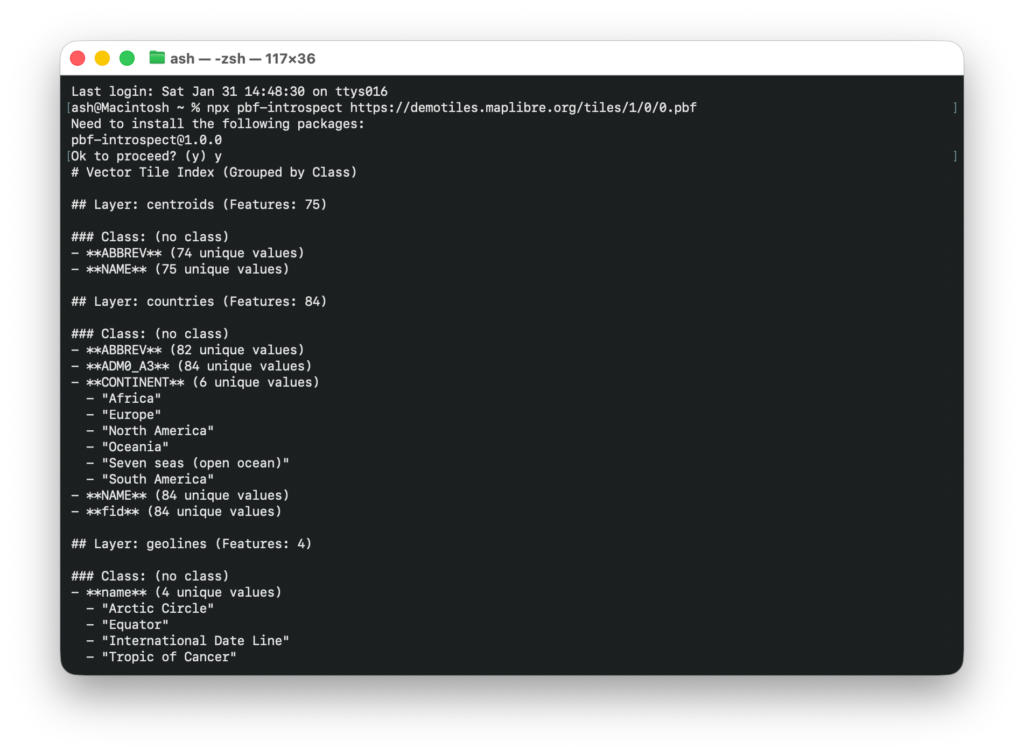
It’s kind of a game changer, just run npx pbf-introspect https://someurl and get all* of the properties straight back. The json output is also handy to prompt your robot coworker, if you have one.