I am exhausted today. Late night for queer tech drinks, then an early start to let the Cockroach Men in. They came an hour and a half late because they had my number wrong and couldn’t get into the complex; the dude was overwhelmed and looked like he was going to burst into tears.
Later, the little bottle of orange juice was structurally unsound and splurted out as I cracked the top. I decanted it into a glass.
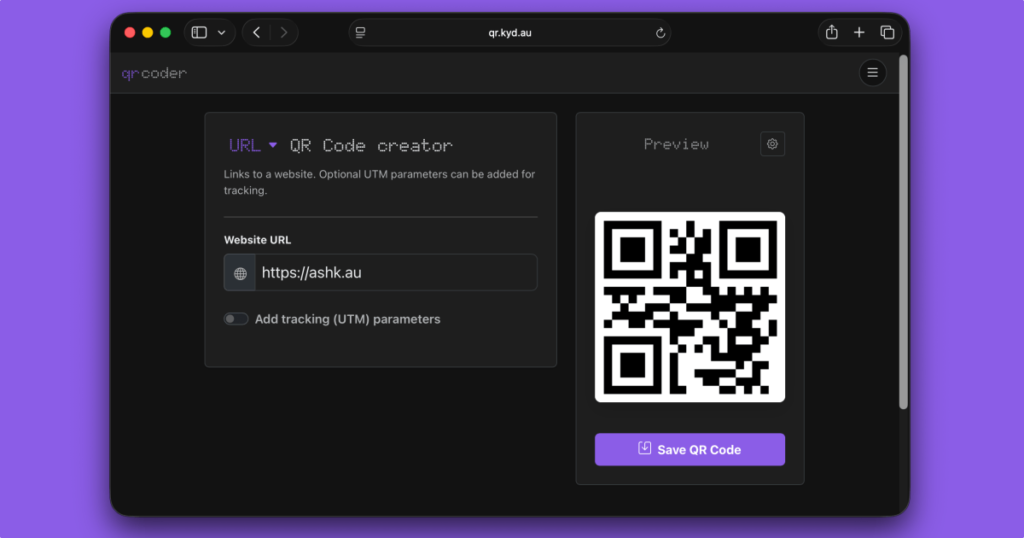
I don’t know how many times I’ve searched for a QR code creator only to land on some dodgy, slow website that’s full of ads. So I made my own.
For the longest time it was a bare basic nothingburger to get the job done. But today I spent a bit of time tweaking it, expending it, learning about Preact server rendering, adding a service worker to make it installable, and turning it into something a bit more feature complete.
I mostly use it to quickly send stuff to my phone, especially while developing.
But the new version is kind of fun because it supports a bunch of different types of QR codes, some which I didn’t even realise were possible. You can create normal things like links or contact cards, but also map locations that open in your maps app, phone numbers, calendar invites and even wifi autoconnect prompts.
This is mostly a thing to scratch an itch, but I think it’s a pretty useful tool so hopefully you will too.
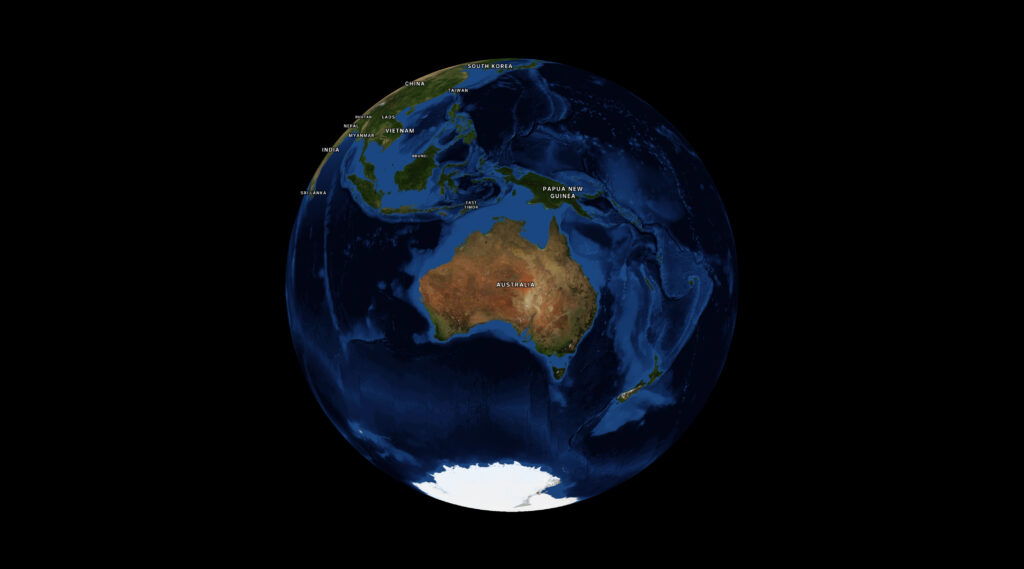
MapLibre introduced a globe mode, which is really cool. But one thing I had a lot of trouble with was making the globe take up all the available screen space without either overflowing or leaving a bunch of whitespace at the sides.
Initially I thought I could call fitBounds with the coordinates on each corner of my globe, but that only worked at latitude 0; once we started panning and zooming around the calculation would break down. This is for several reasons:
firstly, I was calculating coordinates based on the longitude, but for the latitude I’d just stuck the two poles in, figuring the top and bottom of the map would do. But the poles get visually closer together when you change the latitude. No good.
in MapLibre the zoom level (z) affects the map differently depending on your latitude. So at the poles, you need to have a super zoomed out z value to see the same amount of globe as you do at the equator. This means you have to calculate the zoom value every time the latitude changes.
This turned out to be too hard and I’d given up a few times, until I started messing around with Antigravity trying to tune my bad algorithm.
Every so often the LLM manages to do something that I would not in a million years. This is something I’ve been agonising over, and with a bit of iteration the damn thing did it with plain maths and known values:
    function fitTheGlobe() {
      if (!mapRoot.map) return;

      const container = mapRoot.map.getContainer();
      const width = container.clientWidth;
      const height = container.clientHeight;

      // 1. Determine how big (in pixels) we want the globe diameter to be on screen.
      const padding = -20; // visually tweak to fit
      const targetDiameterPx = Math.min(width, height) - padding * 2;

      // 2. MapLibre's zoom logic is based on a Mercator projection, which stretches
      // the world as you move away from the equator by a factor of 1/cos(latitude).
      // To keep the globe a constant physical size, we must shrink our target
      // dimensions by cos(latitude) to counteract that internal magnification.
      const lat = mapRoot.map.getCenter().lat;
      const latRad = (lat * Math.PI) / 180;
      const mercatorScaleCorrection = Math.cos(latRad);

      // 3. Calculate the necessary world circumference (in pixels) to achieve
      // our target diameter. On a sphere, Circumference = Diameter * PI.
      const requiredWorldCircumferencePx = targetDiameterPx * Math.PI * mercatorScaleCorrection;

      // 4. MapLibre defines Zoom 0 as a world circumference of 512px.
      // Each zoom level doubles the pixel size (exponential growth: 512 * 2^z).
      // We use Math.log2 to convert that pixel growth back into a linear zoom level 'z'.
      const targetZoom = Math.log2(requiredWorldCircumferencePx / 512);

      const currentZoom = mapRoot.map.getZoom();
      const threshold = 0.01;

      if (Math.abs(currentZoom - targetZoom) > threshold) {
        mapRoot.map.flyTo({
          zoom: targetZoom,
          duration: animationDuration,
          essential: true
        });
      }
    }
I prompted it to split the calculation out and document what’s happening and I think this is a pretty accurate take. The conditional at the end guards against rounding errors and jitter. The vibes feel good.
Look, I don’t fully understand the maths, and there’s a bit more padding the bigger your screen gets. But deeply understanding this is not necessary for me to get my work done so I’m fine with that.
Ultimately it would be nice to have a built-in function in MapLibre, and if I get a moment I’ll see if I can wrap my head around it enough to make a PR back upstream. In the meantime, I hope this helps.
I’ve been working with MapLibre a lot recently, and every so often I come across a weird bug. This one was particularly annoying; our corporate font doesn’t have the glyphs required to render certain characters. Rolling around the map I’d spot places like Vit Nam (Việt Nam), and Smoa (Sāmoa), and put it on my to-do list to deal with later.
Well, now is later. And I have to find a fix.
My first thought was that we were possibly using the wrong place names. My second thought was to change the field we take names from. I don’t recall what the default was, but changing it to name:en was enough to get most labels rendering properly.
However Samoa was stubborn; I was still getting “Smoa”, and had to do some investigation to work it out.
What’s in a tile?
Web maps use tiles to break up data downloads, and modern ones use the pbf (protocolbuffer format) rather than PNGs or JPEGs. PBFs give you vector data so you can style your maps on the frontend.
My first step was to determine if the issue was in the data itself, or the rendering. I identified the specific pbf tile by zooming right in on Samoa and picking a random one out of the network tab, then downloaded it to inspect.
Since I don’t have time for this, I got the AI to write a script to list the properties the renderer could use, using @mapbox/vector-tile:
import fs from 'node:fs/promises';
import Pbf from 'pbf';
import { VectorTile } from '@mapbox/vector-tile';

const data = await fs.readFile('tile.pbf');
const tile = new VectorTile(new Pbf(data));

// Inspect the 'place' layer where country labels live
const layer = tile.layers.place;

// Find the feature by ISO code using a functional approach
const samoa = Array.from({ length: layer.length }, (_, i) => layer.feature(i))
  .find(f => f.properties.iso_a2 === 'WS');

if (samoa) {
  console.log(JSON.stringify(samoa.properties, null, 2));
}
This filtered through the features and printed every property available on the country object, which I think will be useful for all kinds of other styling purposes. The output, truncated:
In this specific tile set, every common English fallback property contained the non-ASCII character ā. Since our custom brand font didn’t include a glyph for that character, MapLibre dropped it leaving us with “Smoa”.
So like, ok now what? Search & replace for MapLibre labels
Since I have no control over our font or tiles, I needed to rewrite the label on the fly. I hoped I could use some kind of string replace function to turn the mācron characters into the standard letter a, but MapLibre expressions don’t have a string.replace() function.
Fortunately, for countries, we can write MapLibre expressions using the ISO country code (iso_a2) to replace the label value:
const nameFallback = [
  'coalesce',
  ['get', 'name_en'],
  ['get', 'name:en'],
  ['get', 'name:latin'],
  ['get', 'name']
];

layer.layout['text-field'] = [
  'case',
  // Is this a country label?
  ['==', ['get', 'class'], 'country'],
  [
    'match',
    ['get', 'iso_a2'],
    'WS', 'Samoa',            // ASCII rewrite for Sāmoa
    'CI', "Cote d'Ivoire",    // ASCII rewrite for Côte d'Ivoire
    'ST', 'Sao Tome and Principe',
    nameFallback              // Default country fallback
  ],
  nameFallback                // Default for cities, towns, etc.
];
I’m using Javascript to search through an existing style.json and set values. But you could just as easily implement a short list of hard-coded countries directly in your style.json. Not a great solution, but a band-aid to get us by for now.
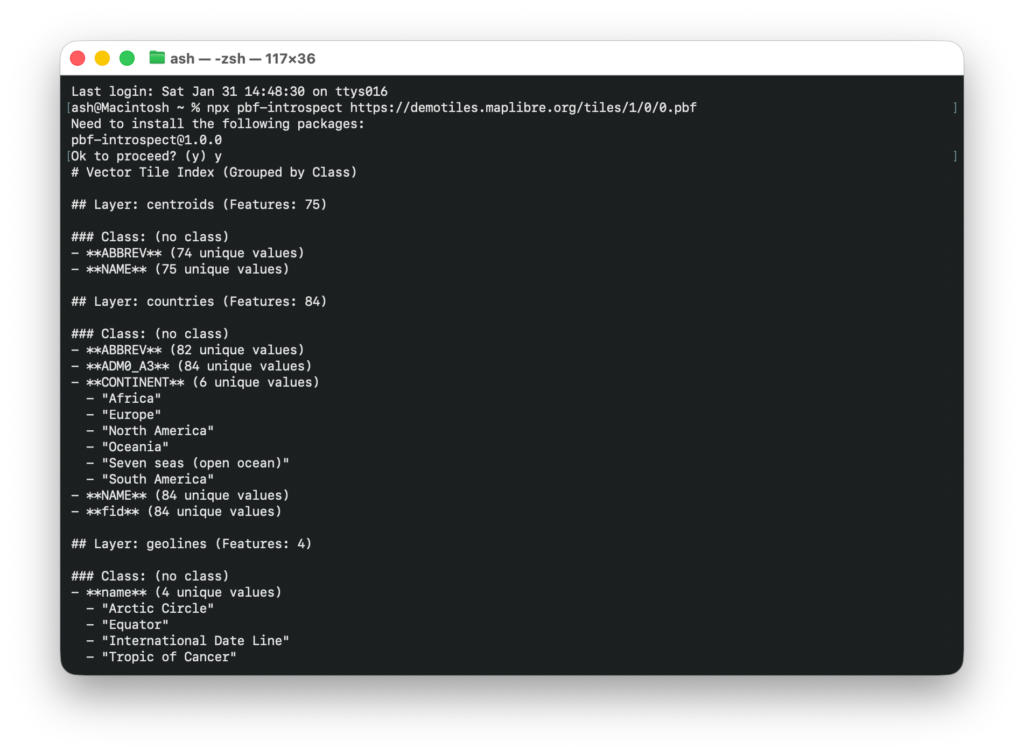
As an addendum, I found the ability to introspect PBF files was a super useful debug tool, especially when writing niche styles by hand. So I turned the script into a little npm package that you can run for any remote url:
It’s kind of a game changer, just run npx pbf-introspect https://someurl and get all* of the properties straight back. The json output is also handy to prompt your robot coworker, if you have one.
I’ve been loving my rice cooker. Between that and the air fryer it makes it super easy to prepare work-from-home lunches without having to do much of anything at all.
It’s a little Cuckoo 6-cup pressure rice cooker, which is the perfect size for me. And, look, probably the perfect size for anyone unless you have a massive family. I don’t know why rice cookers are always so enormous.
I’ll usually throw in a bit of seasoning, some msg, assorted herbs, bit of chilli depending on my mood, then put some marinated chicken in the air fryer, pop some some steamed veg on, and voila! It’s a low effort meal, and I can keep working at my desk while it cooks. It’s healthy and tasty, and one of my go-to CBF food strategies.
But today I was feeling a bit of a malaise. I didn’t just want rice and chicken, I wanted something more. Something extravagent. Something with a bit of fat to it, actually.
So when the rice cooker finished I had the genius idea to grate a bit of cheese into it, and stir it through. With a bit of parsley, some chicken salt, a springle of MSG you get cheesy rice! Fucking brilliant.
Continental Cheesy Rice
There used to be a Continental cheesy rice sachet thing I loved when I was a kid. I haven’t had it for decades so I had no idea if they still do it. The real thing was a surprise I didn’t know I needed, but I was curious so I googled it. And what the controversy!
This is my sons favourite food! I add garlic and ginger to spice it up and we love it! We have it at least twice a week. Please tell me you will never discontinue this product! I have just found out woolworths will no longer be selling this product. I am so disappointed. It looks like Coles still sell it so they will become my new weekly shopping destination.
To which the team at Continental replied:
Hi there, Lucy! We are glad that your family are enjoying our Cheesy rice. The team will be thrilled to hear this feedback and rest assured this will be noted for future product development. This has been deleted in Woolies and Coles, but you may still find this in IGA. Hope this helps!
Deleted in Woolies and Coles! I don’t know how Lucy will be able to rest assured about that.
I can’t say I’m hugely surprised it’s disappearing, given the explosion of the more convenient pouch- and microwaveable-rice segment. But the loyal Cheesy Rice consumers are not to be underestimated. Zarli says:
I have been eating cheesy rice for at least 7 years and I don’t think I’ll ever stop. I have it with creamy garlic prawns , chicken wedges , any other meal , on a sandwhich , by itself. I might turn into a cheesy rice if I keep going but please never stop making cheesy rice it’s the best thing ever
One thing is clear, the fans will be devastated when this made-in-Australia staple of ’90s pantries finally stops production. I might pop down to IGA and see if I can hunt down a packet for old time’s sake. Bit of weird food nostalgia.
That said, one reviewer wasn’t happy with the product at all. Phil gave it a scathing 1 out of 5 stars, saying “Not very cheesy.”
“The previous packs from last year were 100% better”
When I first moved back to Australia, I splurged a little on a new Internet router. I went with Google Wifi (now Nest Wifi) because they looked really pretty and the big name was reassuring against the backdrop of crappy brands with outdated software getting hacked all the time.
It turned out to be a medium sized mistake, because it didn’t work very well, the app was slow and buggy, and it just kinda sucked. But it worked fine enough for the past five years, until last week when it started glitching out.
First it disconnected from the mothership in the cloud so I couldn’t login to see what was happening. Then, slowly but surely, chunks of the Internet started disappearing. I rebooted to see if that would fix anything, but the router never came back up and completely took out my internet.
I swapped over to a 4G router and plugged my personal SIM card in. That ran ok for a while until I realised I could also use it to route directly into the NBN. But it was a fiddly solution so I wanted to replace it as soon as possible.
Replacing my router
I already have a separate wifi point set up, so I don’t need wifi in my router. This made things easier and cheaper. I asked around the Internet on my shortlist ended up looking like this:
TP-Link Omada ER707-M2 – the cheapest option, thank you China. A 2.5 gbit router with little else going for it.
Ubiquiti Cloud Gateway Max – a very pretty, more capable option for more than double the price. I was tempted by the shiny marketing, but I’m very reluctant to spend my money in the Untied States given the current social and geopolitical bullshit.
NanoPi R6S – a single board computer, that runs OpenWRT or your own choice of Linux if you want to tinker. This looks kinda awesome, but shipping was exorbitant and the prices on AliExpress left a bad taste. Also it wouldn’t arrive until next month anyway.
So I got the Omada. Paid ten bucks for shipping via Uber and it arrived a couple of hours later, before sitting in the box until I finished work and plugged it in.
I also want to thank the bne.social community who have been donating money into the pile to keep the server going. We dipped into the kitty to replace this one, and though I feel very weird about taking people’s money, it’s a pretty necessary investment.
TP-Link Omada ER707-M2
Unforch I don’t especially like it.
Physically it’s great; it’s a solid metal chassis which harks back to the blue Netgear routers of old. Feels premium. But mentally, the software kind of sucks.
I haven’t been able to get IPv6 working yet because it doesn’t support it by default. I’ve poked around and managed to get a WAN assignment, but local machines still can’t see out to the internet. The inline help is daft to the point of useless, and the docs are questionable at best.
Also frustratingly while there’s an option to enable MDNS, it doesn’t seem to do anything so I can’t resolve any local hostnames. I didn’t even realise that was a router feature until I bought one that didn’t do it. It does have an option to add custom DNS entries, but I can’t get them to work either, and it seems to be a widespread issue.
So it’s a bit of a weird one. To me that rules it out for home or small business use, which leaves me wondering: who is this even for? Cheap idiots like me? Ultimately it’s been a huge fuck-around and I’m somewhat regretting not waiting and going the simpler Linux route.
The dim home: when the smarts go away
To add insult to injury, when the router died it took out my smart home with it. Suddenly none of my lights or outlets were online, which meant my cosy, low-light collection of lamps and accents were no longer usable. The fish tank wasn’t turning on, the bookshelf wasn’t illuminating, the little bulb with the patterns by the couch was dark, and the miniature salt lamp? You guessed it: out like a light. On the flip side, the lamps either side of my bed got stuck at full brightness, so come bedtime I had to reach down into the cobwebs at the back to flick them off at the wall.
But perhaps the most insulting thing was I had to use the big lights. And even worse, they were all configured at different colour temperatures. Yucko.
“The big light is for interrogation purposes only”
All my smart stuff runs through Home Assistant which I quite like. But most of my hardware is run over Zigbee through a hacked dongle running custom firmware that I just couldn’t get talk to me any more, which meant I couldn’t control any of my lights or switches.
I was exhausted after a week at work and not really mentally in it, so I bought the Home Assistant Connect ZB-2 zigbee/thread adapter to replace it. I was hesitant because B has a massive and vocal Home Assistant grudge after he bought into a hardware product they overpromised and completely failed to deliver on. But having seen some reviews, and read their fairly frank explanation of what this thing is and what the limitations are, I figured I’d take a punt. I paid express post so thanks to the inconveniently located weekend non-delivery schedule, it’s going to arrive next week.
On Saturday, B came over and started poking around at the dongle, and we pretty quickly discovered that it’s working completely fine. It was just that the IP address had changed so Home Assistant couldn’t find it. Duh, in retrospect. But now everything works again.
I also took the opportunity to pair my original first gen Lifx colour bulb that’s been sitting disconnected in my desk lamp after it randomly stopped working a year or so back. I’d tried to set it up a few times since, but when I paired it this time, the app helpfully told me why it wasn’t working: this version of Android was too new to connect to the bulb. So I pulled out my emergency iPad, charged it up, and got this ancient thing back online. I bought the light bulb in a black Friday sale back in 2014, and it’s travelled the world with me since. Kind of cool.
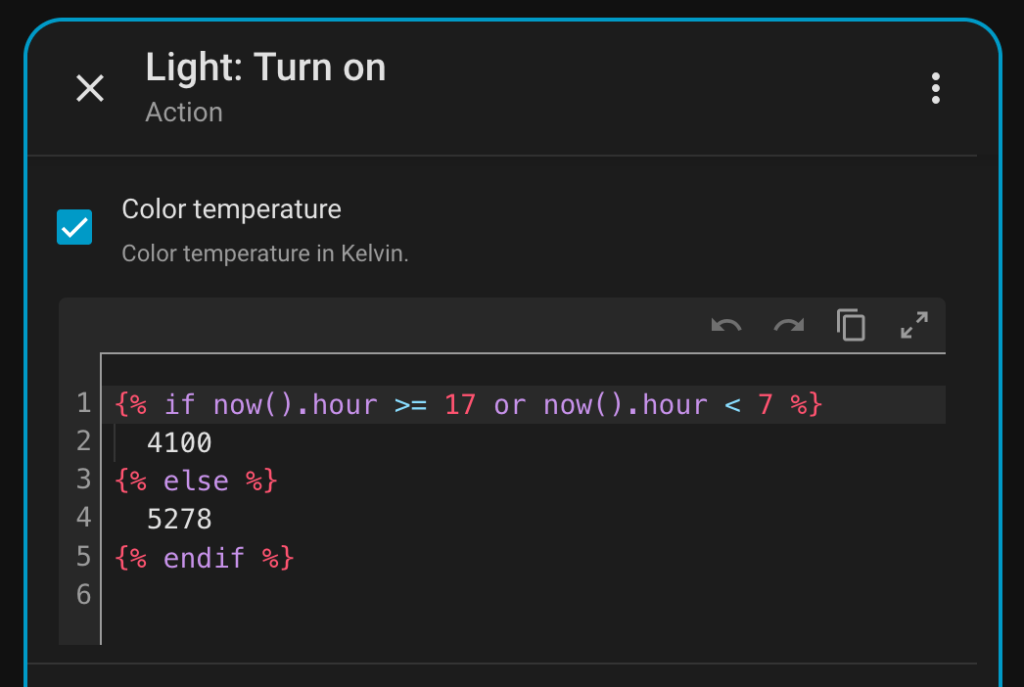
The final thing I’m happy about was setting up a little automation to make sure all my Big Lights are in sync colour temperature-wise. I was really impressed with Gemini, it combined all my requirements into one automation, and I learned a bunch in the process. The Home Assistant GUI is fine enough, but having Gemini create snippets I could edit with YAML, and have them appear back in the GUI is very, very cool actually. I had no idea you could use multiple triggers, or add template logic in values.
Ultimately: this whole thing has been a pain in the butt. I don’t want to have to deal with any of this but I have dug myself into a deep home automation hole in particular.
My place is dark, so I do really like having my lamps and lights come alive in the morning and turn off at night. It’s kind of a SAD lamp situation. I also have a bunch of indoor plants and a fish tank that are only alive because of these automations, so there’s really no going back now.
So I don’t know. Now I’m back online I will have to make peace with the situation and make things as resilient as possible. One of the ways is by disconnecting my automations from the internet completely, but I’ll never be able to disconnect them from my home network. Maybe. Let me know if you have a good zigbee switch that doesn’t burn through batteries.
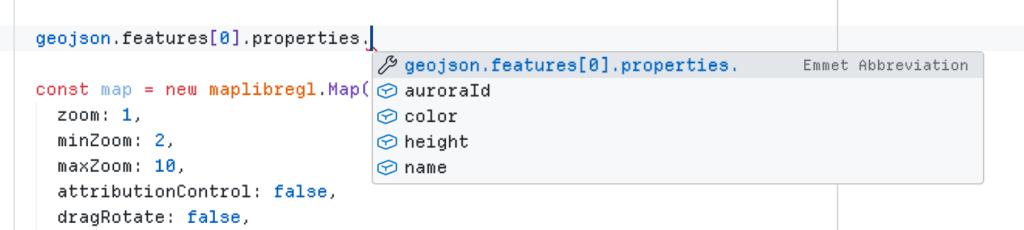
Just a quick note because I found this useful and the @types/geojson docs aren’t especially verbose.
Type a GeoJSON returned from a fetch (TypeScript)
import type { FeatureCollection, Geometry } from 'geojson';

// Create a standard GeoJSON object with custom properties for each feature:
type MyFeatureCollection = FeatureCollection<
    Geometry,
    {
      // Your types go here
      name: string;
      id: string;
      height?: number;
      color?: string;
    }
  >;

// Fetch and apply types to our GeoJSON obj
const myGeoJSON = await fetch('/au.geo.json')
  .then(res => res.json() as Promise<MyFeatureCollection>);
At this point you get autocomplete in VSCode Intellisense (or equivalent), for standard GeoJSON props, as well as your own custom properties. Pretty cool.
The Brisbane Convention Centre has cheap parking, and free car charging. So for $16 a day in parking, I can fill my car up with as much juice as I like. Which is a pretty good deal.
I’ve been meaning to charge the EV for a couple of weeks. It’s been sitting on 10% battery for a fair while now, but just haven’t got around to it. There’s only 8 car chargers, and they get busy during the day, so I usually drop the car in overnight, schedule it to start charging in the morning when there’s plenty of solar in the grid, and voila; free volts. But it’s a big ask. Especially when it’s late, you’re snoozy, and just want to go to bed.
So in the interests of trying something new, I organise with a friend to charge it tomorrow at their apartment complex. We work out the details and I put it in my calendar, but then my brain twitches:
Wait a minute.
Didn’t you drop the car in to charge last week?
And did you ever pick it up again?
No?
How much is THAT going to cost? Will it even still be there? Have they cut the cable and towed it to an undisclosed location?
PANIC!
With a massive pit in my stomach I set my Slack status to “lunch” and race out the door, almost forgetting my car keys. There’s no scooters around, but the bus is only a stop away, so I take that.
I share my situation with the lady in the car park office, who seems nonplussed. “Just drive out” she says.
So I do.
And you know what? The ticket machine has forgotten about me. The QR code scans as per normal, and as the boom gates lift the screen flashes the usual message: “Charged: $16”.
I double-check, and sure enough the invoice has only charged me for today. I was expecting it to run into the hundreds, but there were no consequences whatsoever for my whatever-it-was moment. Bank error in my favour, I’m off scot free. And after all that it’s kind of nice to know that the machines can have forgetful moments too.
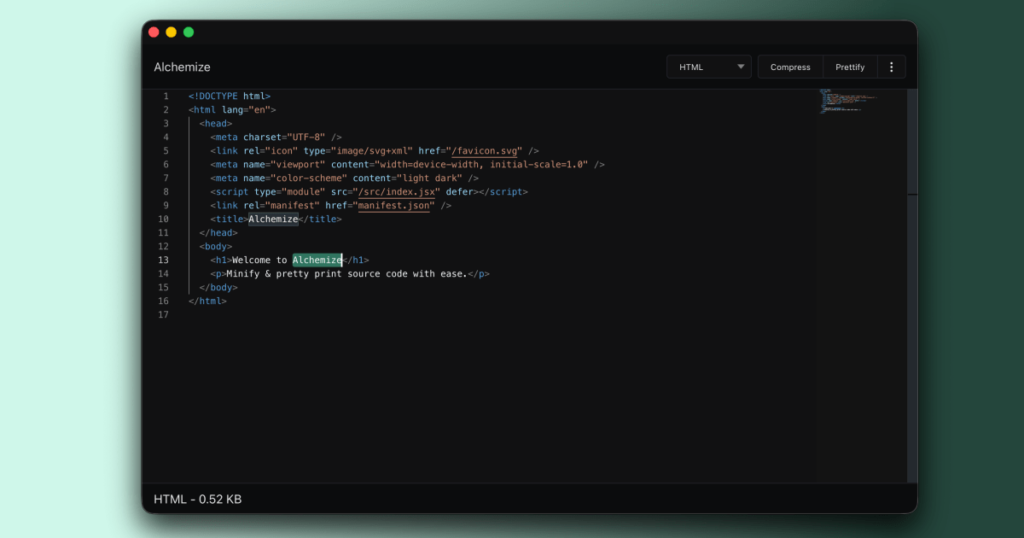
Alchemize is a lightweight tool to minify and pretty-print your code snippets from around the web. It’s perfect for developers to format messy API responses, debug broken or unreadable code, learn new JS tricks from the Terser engine, or share polished snippets with teammates.
Initially written in jQuery and after a good ten years since the last release, I thought it was time to rewrite my little code playground from scratch.
The new Alchemize is based on Preact and Vite for a more modern developer experience, uses the same editor component as VSCode, and natively supports light and dark mode. It’s been upgraded to mainly use Terser and Prettier under the hood, which brings updated JS & CSS support and should make these a lot easier to maintain going forward.
♻️ Modern tech stack A complete under-the-hood revamp for better performance and future-ready support. 🛠️ Industry-standard tooling Built on trusted technologies like Prettier and Terser for formatting and minification. ✨ Latest JavaScript and CSS support Enjoy the most up-to-date syntax features and improved styling support. 📚 Better language detection Alchemize now does a smarter job at figuring out what kind of code you’re working with.
What people said about v2
Before Google killed off Chrome apps, the app had a loyal following on the Chrome Web Store where it got a bunch of great reviews which really made my day:
“Great for checking, untangling, prettifying, and minifying JSON and other formats.”
Richard H
“Very helpful, small and effective, without the bloat of a full editor — with great error-catching capability.”
Stefan C
“I’m using this more and more now. Perfect way to make my code look nice before sharing it.”
Andrew L
🚀 Try Alchemize v3 today
The new version is live — no installation required unless you want to install it as a desktop app. Just open the app, paste your code, and experience the magic:
Pocket was a pretty great little app. It let you save articles, read them later, tag them etc. I used it because it was integrated with my Kobo ebook reader, so I could save stories and read them on that. But then Mozilla unceremoniously killed it.
I wouldn’t have minded so much except that I’m using the API to power the bookmarks section of my website. I was using it to share articles I find particularly interesting, and there’s an RSS feed for the particularly adventurous. But that’s been broken for the last little while.
I migrated over to Instapaper since that seemed to be the reliable alternative, but their API has a manual human approval process, and I’m neither patient nor confident enough that will succeed.
So I had a new idea: what if I just post to Mastodon with a specific hashtag, then use the Mastodon API to collate them all together. That way get the benefit of sharing links on socials, but it’s also much easier than having another third party app.
Long story short I gave Kilo Code some specs and it built an implementation that searches the Mastodon API for posts matching any post from me with the hashtag #link (just searches for “#link from:@ash“), then it grabs the metadata and hashtags from the API, and merges those into my existing bookmarks.json file that runs the whole thing.
I’m not going to post code because you can probably write something more to your liking. But I thought the concept was cool, and now I’m thinking about other possibilities, like having a music recommendations playlist that pulls from my posts in the #NowListening hashtag.
I saw this post on BlueSky the other day and it tickled me slightly. And I was reminded of it because in a way, that’s exactly what I’m doing now. Using loosely marked up socials as the backend.
BlueSky and YouTube are down at the same time. This is because, to save money on storage costs, BlueSky just saves all our posts as comments on one kid’s middle school science fair presentation in 2011 (he lost)